Maintenance & inspection

Maintenance plans that almost run themselves

Mango Inventory: inventory management for organisations with a lot of inventory. Maintenance plans, inspection dates, checklists — in one app. From CHF 119€119£119$119 per month.

Free to try up to 50 items · no credit card required

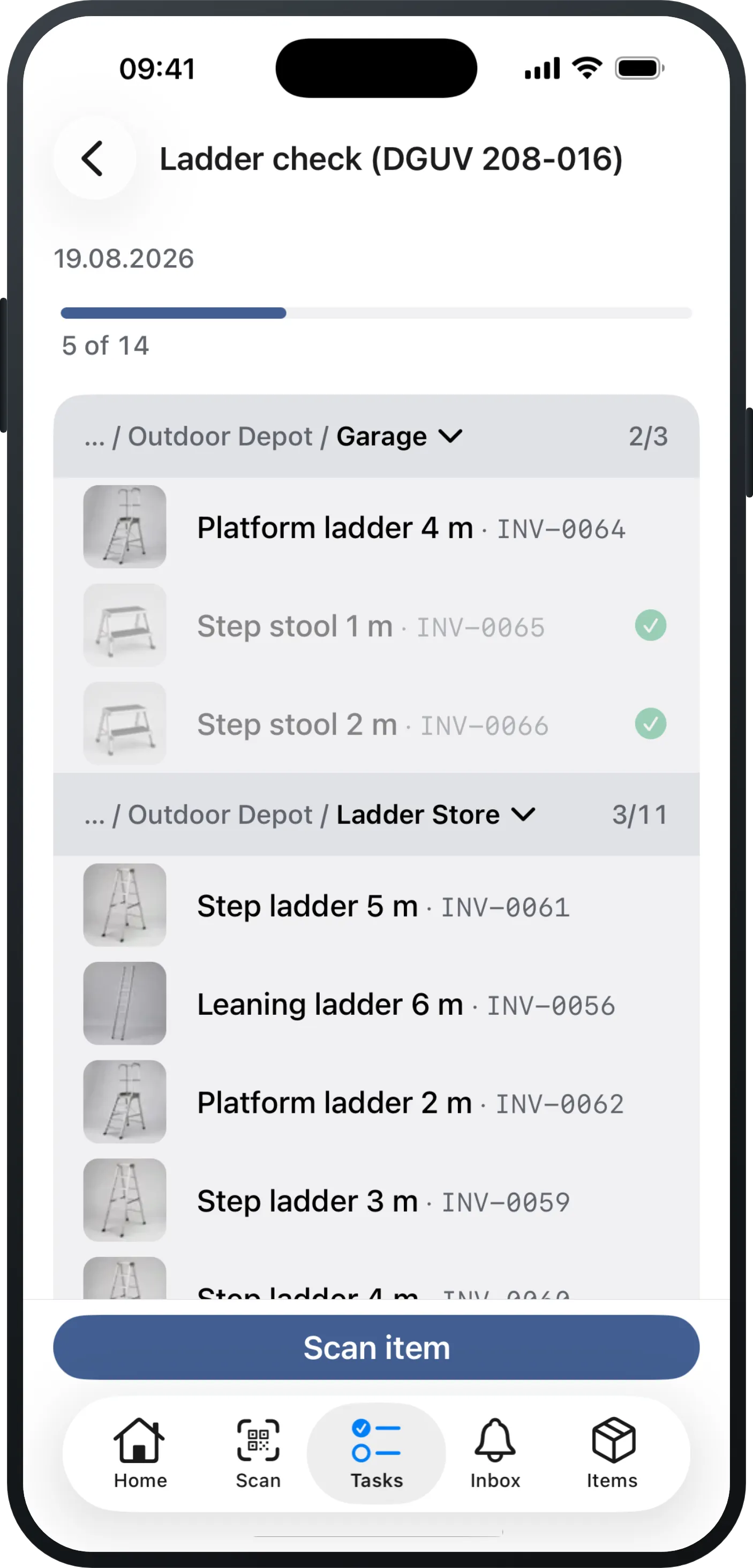
A check round in the Mango Inventory app on iPhone: a progress bar above the list, below it the ladders that are due grouped by location — one band per room with its own counter, every row with a photo and inventory number, and “Scan item” at the bottom.
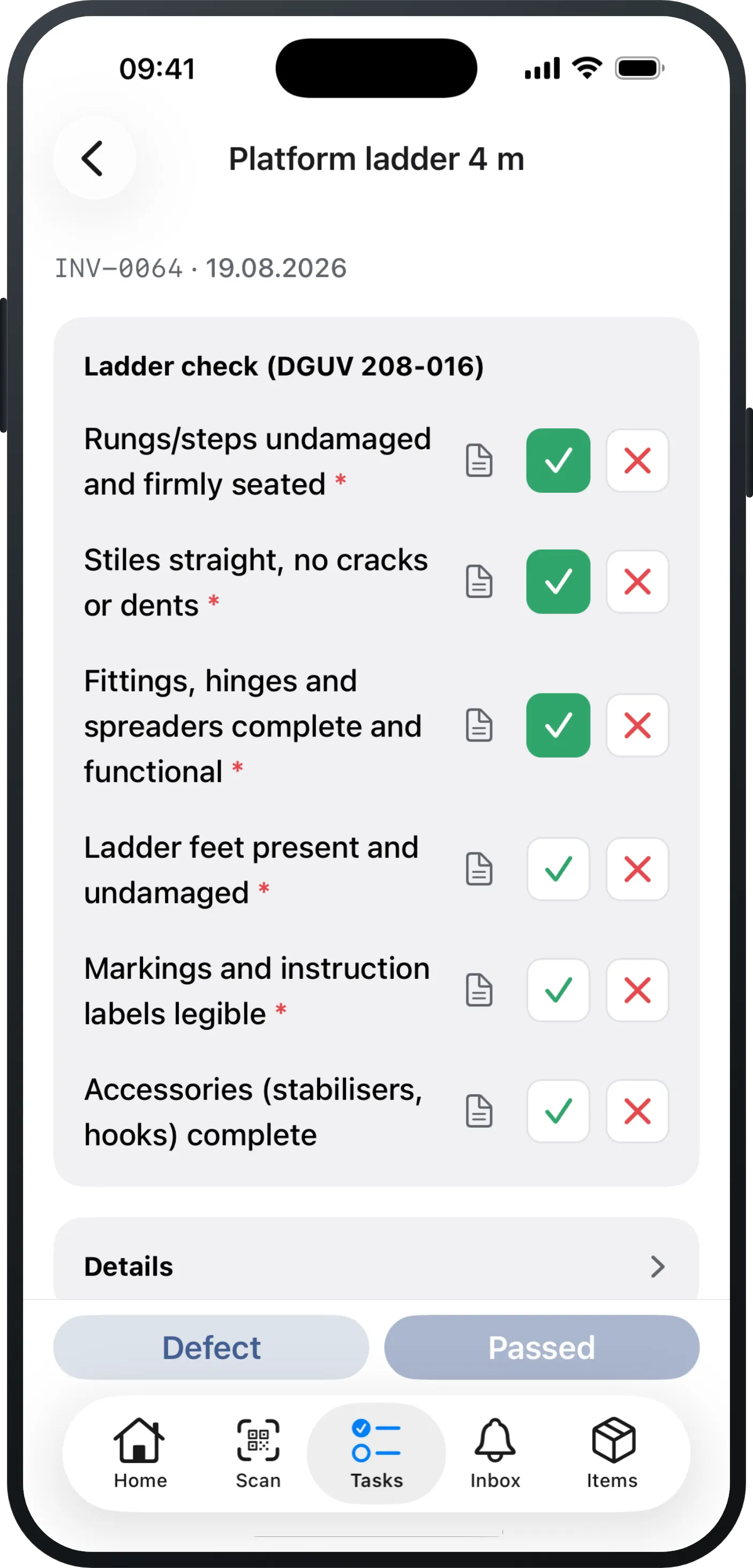
The checklist of a single check on iPhone: the item name, its inventory number and the due date at the top, the check points below them with a green tick on the ones already answered, and a bar at the bottom with “Defect” and a still-disabled “Passed”.
Book a personal demo
  • Software from Zurich
  • Data in Europe
  • Free migration
  • Money-back guarantee

Sound familiar?

“When something happens — who is liable?”

Not “the organisation” — a person is liable. And in case of doubt, everyone else has an excuse ready.

“Reported defective — and still in use”

Faulty gear must leave circulation. Without a status on the item, the ladder is back on the van by morning.

“Everything has a deadline — each a different one”

Ladders yearly, electrical every six months, PPE, racking, hoses: five clocks at once. Nobody keeps that on paper.

How maintenance planning works — in three steps

  1. 1CapturePhotograph your items, or upload your Excel list.
  2. 2The planPick a category, set the interval, done — and the app reminds you by itself.
  3. 3The roundThrough the building in the app, room by room.

Are your inspection dates still on a calendar or in a spreadsheet? That is exactly what steps 1 and 2 are for.

“We haven't got any of it recorded yet.”

1 · Capture — faster than you think

  • Create by appTake a photo, the AI fills in the details, check them over, save.
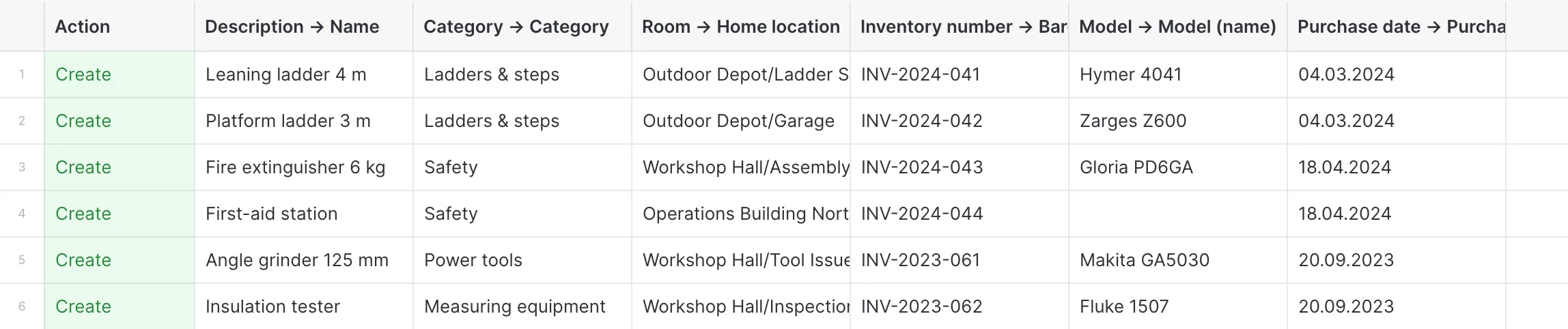
  • Create by importUpload your Excel, look through the preview — and it is in.
  • Rather hand it over?If you like, we do the migration for you, free of charge.

Along the way you get a clean overview of your entire inventory — and that is exactly what every maintenance plan builds on.

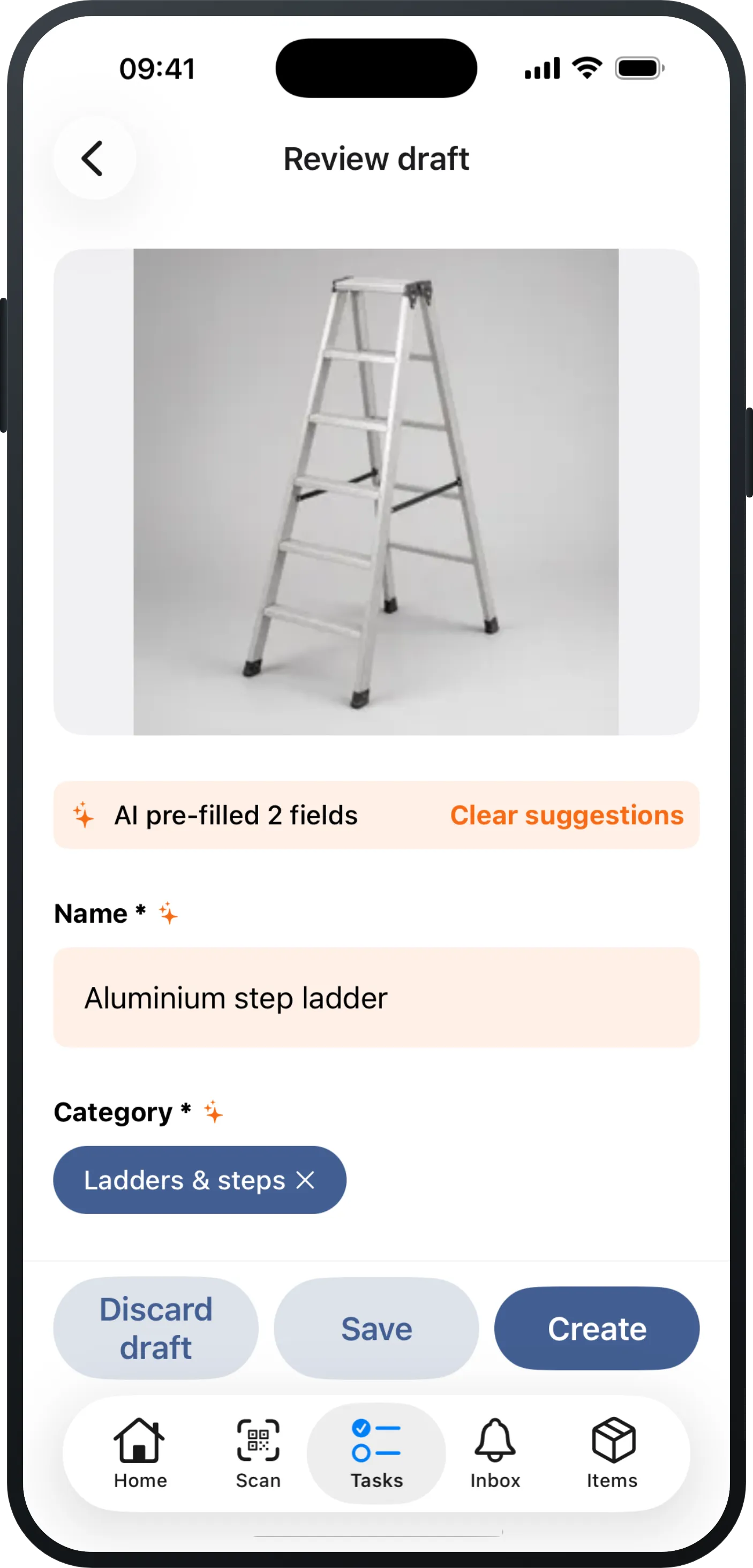
An iPhone showing a freshly photographed capture in Mango Inventory: the photo of an aluminium step ladder at the top, below it the “AI pre-filled 2 fields” note and the already filled-in “Name” (“Aluminium step ladder”) and “Category” (“Ladders & steps”) fields, and the buttons “Discard draft”, “Save” and “Create” at the bottom.
Photo taken — the draft is filled in already.
The import preview in Mango Inventory: every column of the uploaded file headed by its target — “Description → Name”, “Category → Category”, “Room → Home location” — and under them six devices that need regular inspection, each with its green “Create” action: leaning ladder 4 m, platform ladder 3 m, fire extinguisher 6 kg, first-aid station, angle grinder 125 mm and insulation tester.
Upload, quick check — all in.

“Our inspection dates live in a spreadsheet — and nobody knows whether every device is really on it.”

2 · No device gets forgotten

  • One click, every devicePick the category, and every ladder is on the plan.
  • Bought today? Already on the planNew devices land on the right plan by themselves.
  • ReminderIt tells you by itself.
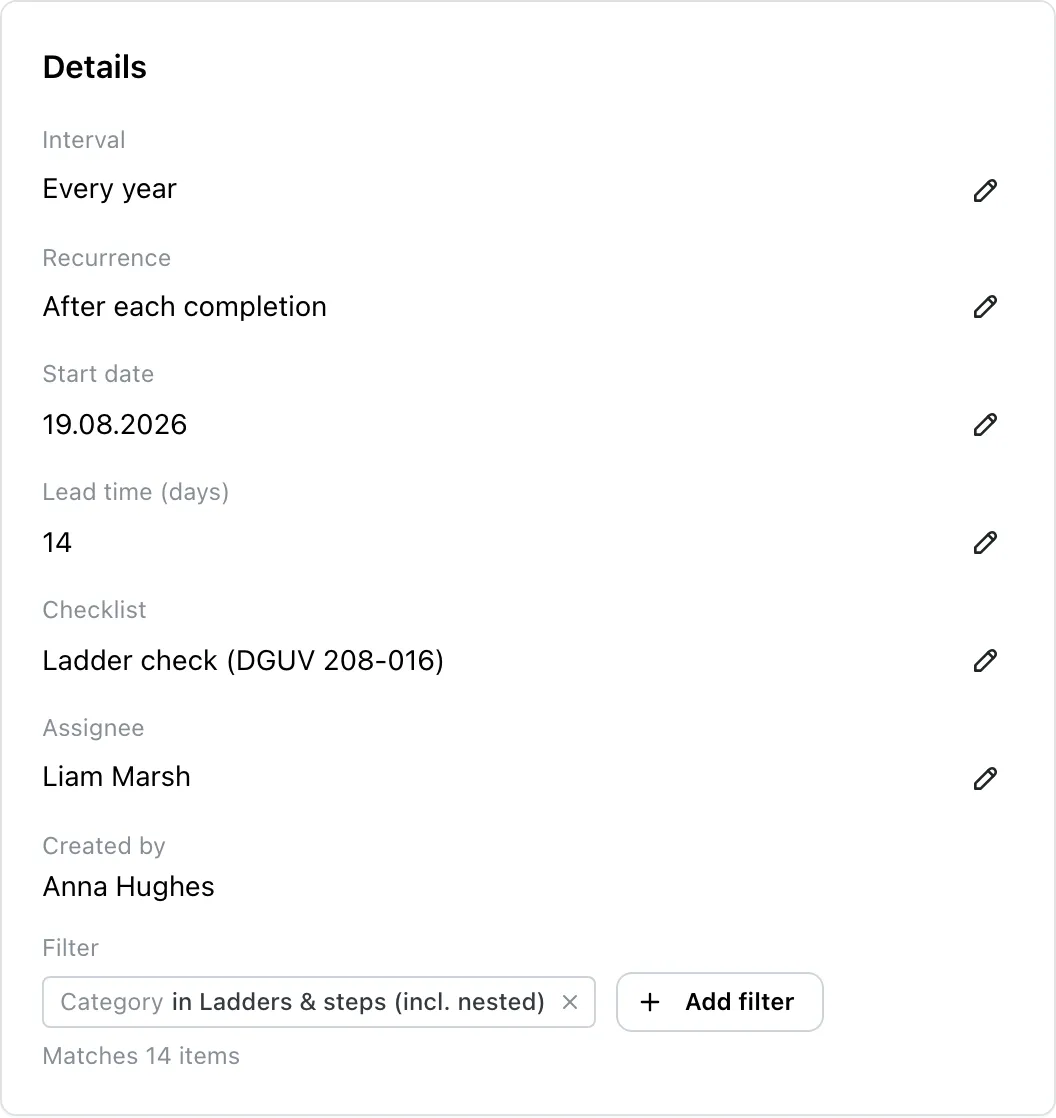
A maintenance plan in Mango Inventory: interval, repetition, start date, lead time in days, the checklist it uses and the person it is assigned to, and below them the category filter with the line stating how many items the plan matches.
Under the filter you see how many devices the plan covers.

“Open every single ladder? We do not have the time for that.”

3 · The round: room by room

  • All at onceAll the open checks of a plan become one round.
  • A checklist, not a notepadPoint by point, with notes and photos where needed.
  • A defect? Becomes a ticketThe repair has an owner straight away.

All the detail: maintenance plans step by step

The open check round in the Mango Inventory app on iPhone: a progress bar under the title, below it one collapsible band per location with its own counter, the ladders due inside them with their photo and inventory number, and the “Scan item” button along the bottom edge.
Sorted by room — in each one you see what is still open.
The checklist of a single check on iPhone: the item name, its inventory number and the due date at the top, the check points below them with a green tick on the ones already answered, and a bar at the bottom with “Defect” and a still-disabled “Passed”.
The device checklist.

Set up your first plan — with your own devices, in a couple of minutes.

Free to try up to 50 items · no credit card required

The record writes itself

  • All on the itemWho, when, and with what result.
  • Check overdue? Defect reported?The app warns before the item goes out.
  • You see the gaps firstThe overview lists items with no plan.
  • An auditor asks?You have the answer.

You came for maintenance. What keeps you is everything attached to it.

01 · LabelingIn every plan

Every item gets a label
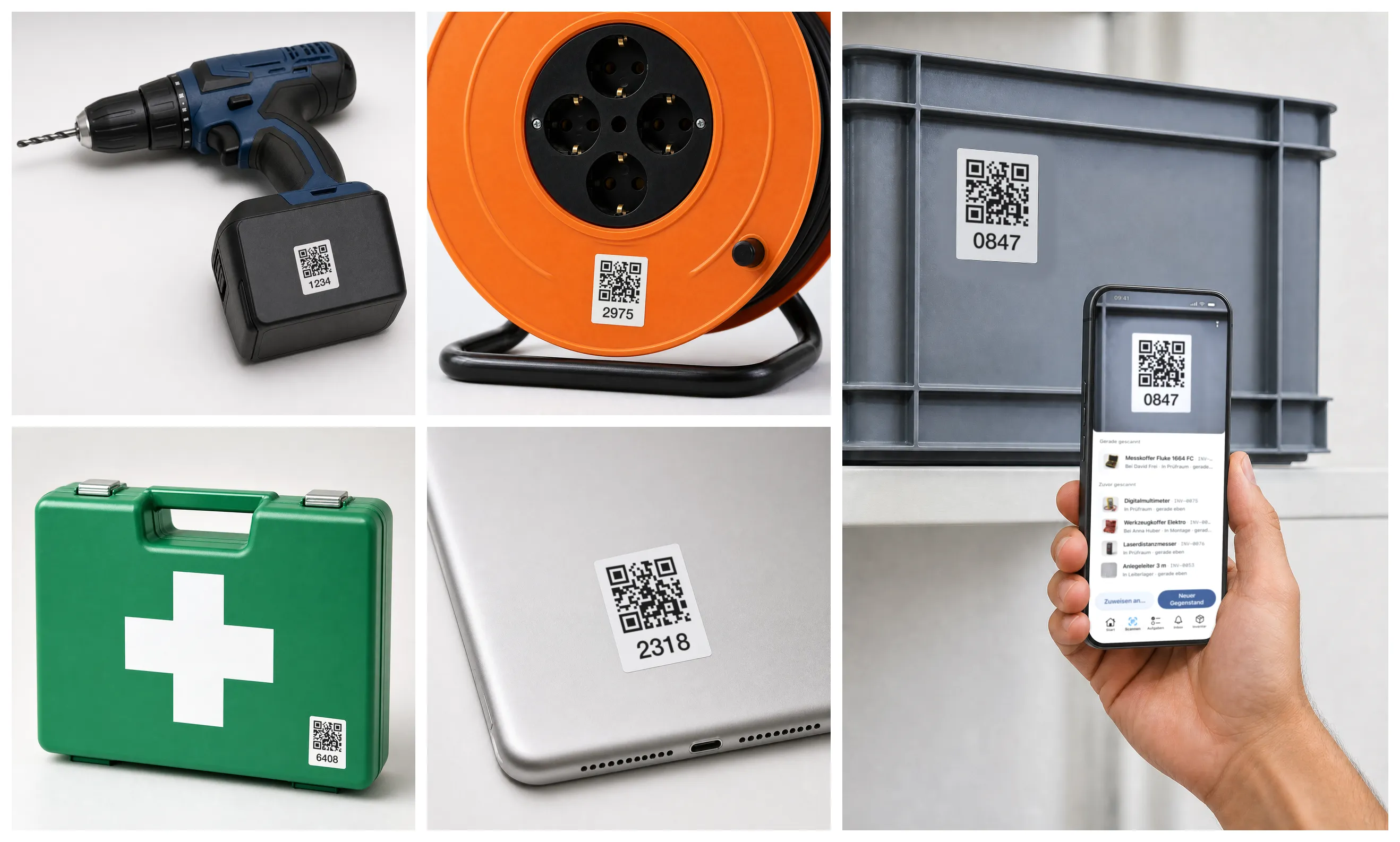
Collage: four items with QR labels and inventory numbers — a drill, a cable drum, a first-aid case and a tablet — next to them a hand scanning a label on a storage crate with a smartphone.
  • Stick the labels onPre-printed from us or straight from the app.
  • Just scanOpens the item: who has it, where it is, since when.
  • For the whole teamEveryone scans with their own phone.

More in the docs

02 · OverviewIn every plan

Your entire inventory at a glance

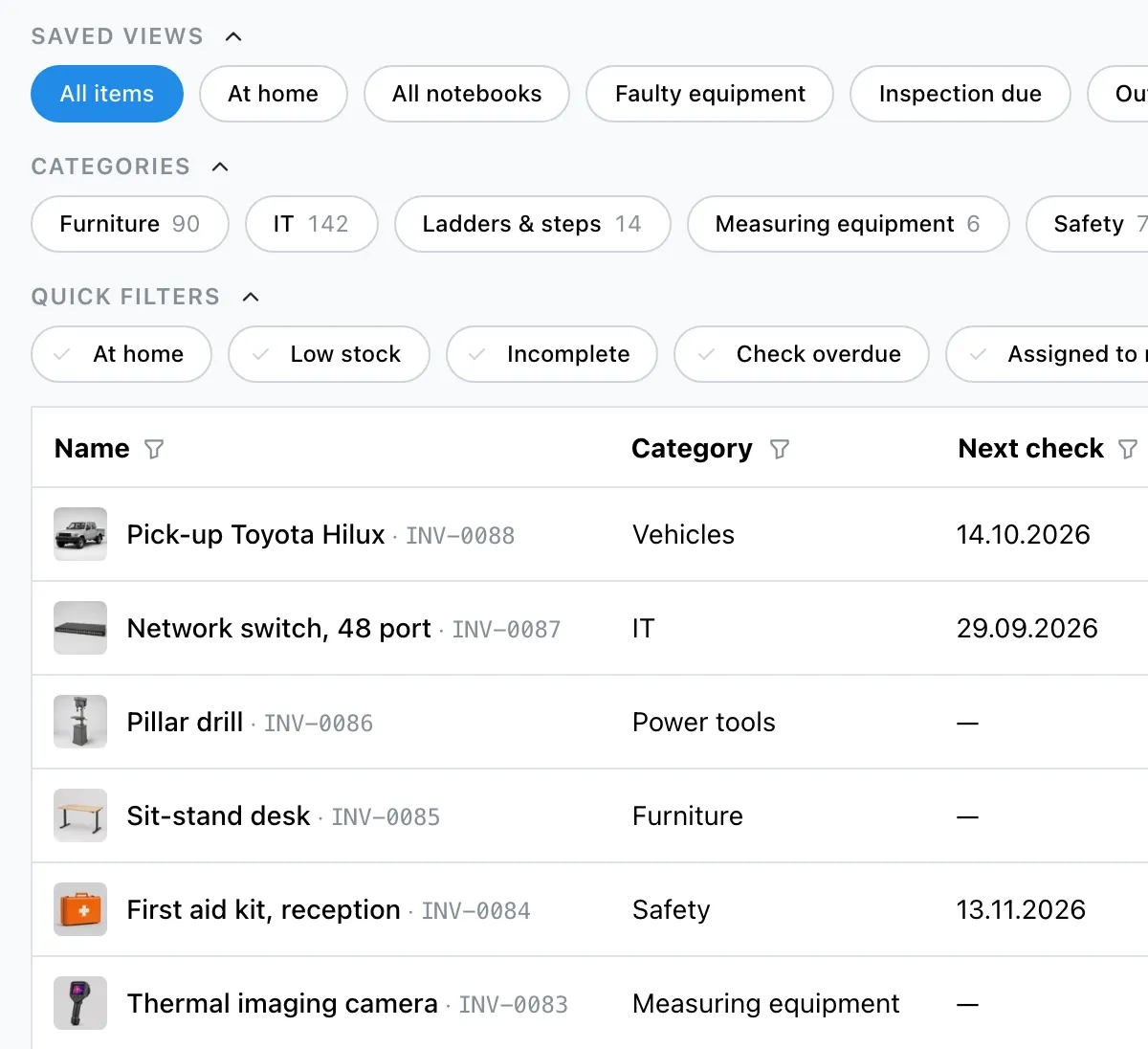
The item list in Mango Inventory: saved views, categories and quick filters above the table, below them rows with a picture, name, inventory number, category and next check.
  • How many? Where? Who has it?It is all in one list, no walk-around, no phone calls.
  • Everyone sees the same thingNo more juggling three Excel versions.
  • The way you workYour own categories, your own fields: The list speaks your language.

More in the docs

03 · StocktakingFrom Pro

Stocktaking in hours, not days

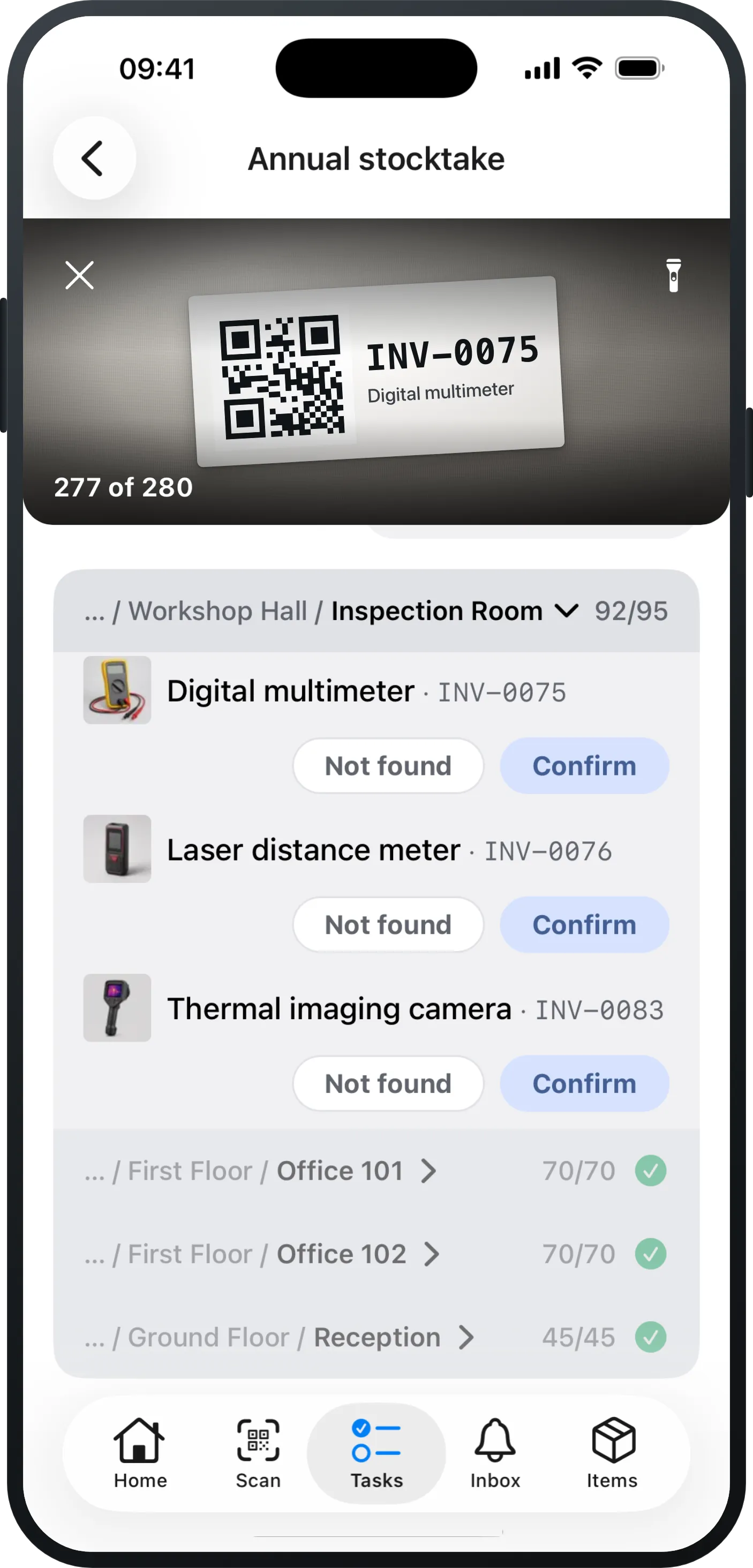
Counting in the Mango Inventory app on the iPhone: the camera image at the top with a captured label, below it the active room with its open items and, per row, “Not found” and “Confirm”, and under that the rooms already finished.
  • Count in the appScan the QR label or tap it.
  • Count less, finish soonerMoved recently? Worth under CHF 500€500£500$500? Leave it out!
  • The app walks you through the roomsand shows what is still open.

Discover stocktaking in Mango →

04 · Defect reports & ticketsFrom Pro

Work assigned. Responsibility clear.

  • All managed in one placeDefect reports, maintenance plans, restocking, stocktakes.
  • Assigned automaticallyEvery task goes to the person responsible, automatically.
  • Gear that worksNo device sits broken for months.

More in the docs

05 · Check-out & returnIn every plan

Who has what? Always visible.

  • Checking outScan, pick the person, done.
  • ReturnOne click.
  • Your structureYou decide who and where things go to: people, teams, rooms — and you see at a glance what is still out.

More in the docs

Maintenance plans: free to try, then in the Premium plan

Up to 50 items you try everything at your own pace, maintenance plans included. For day-to-day operation you want the Premium plan: CHF 119€119£119$119 per month per started 1,000 items, with as many users as you like.

Free

CHF 0€0£0$0

up to 50 items

Free to try up to 50 items — every function, maintenance plans included. Like a demo, only with your own devices.

  • All features included
  • Up to 50 items
  • Unlimited users
Start free

No credit card required

Essential

CHF 29€29£29$29

per month per 1,000 items

without maintenance plans

The complete Excel replacement for everyday work.

  • Items, categories & custom fields
  • Your whole inventory in one view
  • Check-out & return by scan
  • Printable QR labels
  • Excel import & export
  • Free Excel migration on request
Start now

Free to try up to 50 items · no credit card required
Pro

CHF 69€69£69$69

per month per 1,000 items

without maintenance plans

For organisations with processes: stocktaking & tickets.

  • Everything in Essential
  • Stocktaking in the app
  • Defect reports & tickets
  • Orders & reservations
  • Consumables & minimum stock levels
  • Free Excel migration on request
Start now

Free to try up to 50 items · no credit card required
With maintenance plans

Premium

CHF 119€119£119$119

per month per 1,000 items

This is where maintenance plans and checklists live — plus stocktaking, tickets and orders.

  • Everything in Pro
  • Maintenance plans incl. checklists
  • Single Sign-on (Microsoft / Google)
  • Directory sync
  • API & integrations
  • Advanced roles & permissions
  • Free Excel migration on request
Start now

Free to try up to 50 items · no credit card required

  • Money-back guarantee
  • No setup fee
  • Cancel monthly
  • Download your data anytime
  • Free migration
Compare all features

Detailed feature mapping. — Free includes all features — up to 50 items.

FeatureEssentialProPremium
Inventory & everyday use
Items, categories & custom fieldsIncludedIncludedIncluded
Item models for identical devicesIncludedIncludedIncluded
Check-out & return by scanIncludedIncludedIncluded
Scanner & printable QR labelsIncludedIncludedIncluded
Excel import with AI column mappingIncludedIncludedIncluded
Export (Excel/CSV), any timeIncludedIncludedIncluded
Saved views & dashboardIncludedIncludedIncluded
Item history & activity feedIncludedIncludedIncluded
Quick photo capture (drafts)IncludedIncludedIncluded
Processes
Stocktaking in the appNot includedIncludedIncluded
Defect reports & ticketsNot includedIncludedIncluded
Orders & reservationsNot includedIncludedIncluded
Consumables, quantities & minimum stock levelsNot includedIncludedIncluded
Organisation & IT
Maintenance plans incl. checklistsNot includedNot includedIncluded
Single Sign-on (Microsoft / Google)Not includedNot includedIncluded
Directory syncNot includedNot includedIncluded
API & integrationsNot includedNot includedIncluded
Advanced roles & permissionsNot includedNot includedIncluded

Free includes all features — up to 50 items.

Inventory & everyday use(9)
  • Items, categories & custom fieldsFrom Essential
  • Item models for identical devicesFrom Essential
  • Check-out & return by scanFrom Essential
  • Scanner & printable QR labelsFrom Essential
  • Excel import with AI column mappingFrom Essential
  • Export (Excel/CSV), any timeFrom Essential
  • Saved views & dashboardFrom Essential
  • Item history & activity feedFrom Essential
  • Quick photo capture (drafts)From Essential
Processes(4)
  • Stocktaking in the appFrom Pro
  • Defect reports & ticketsFrom Pro
  • Orders & reservationsFrom Pro
  • Consumables, quantities & minimum stock levelsFrom Pro
Organisation & IT(5)
  • Maintenance plans incl. checklistsFrom Premium
  • Single Sign-on (Microsoft / Google)From Premium
  • Directory syncFrom Premium
  • API & integrationsFrom Premium
  • Advanced roles & permissionsFrom Premium

Frequently asked questions about maintenance plans

How long does setting up take?

A plan is done in a couple of minutes: pick the category, set the interval, name who is responsible, add the checklist. What takes longer, if anything, is bringing your existing inspection dates over — you type those in row by row in the fill-in mode, or set one common start date for all the devices.

What is a maintenance plan?

A maintenance plan states which devices are checked at what interval and which points have to be worked through — from the fire extinguisher to the ladder. In Mango Inventory a plan sits on a category rather than on a list of dates: the maintenance software creates a ticket for the responsible person in good time and works out the next due date after every check. New devices in that category are included automatically.

Docs: maintenance plans →
Do we need scanners?

No. There is no extra hardware to buy. Your people walk the round in the app — and anyone who would rather work at the computer walks the same round there. You can scan labels if you have them, but you do not have to.

Docs: mobile app →
Who sees what is due?

The person or the team named in the plan: the check appears under “My tasks”, overdue in red at the top. When somebody takes over a team task, it is visible who is working on it. Next to that, the “Maintenance & inspection” page answers the same question for everyone: what is due, what is overdue, and which items have no plan at all.

Docs: my tasks →
What happens if you find a fault?

You record the finding right there in the check: what was wrong and whether the item is set to defective — a photo of it belongs on the individual check point or on the ticket. The repair gets a linked defect ticket with an owner of its own. The check still counts as done, and the next date carries on as normal.

Docs: tickets →
What does it cost?

Up to 50 items you try Mango Inventory for free, with every function and without a credit card. Maintenance plans with checklists then run on the Premium plan — the prices are further up this page.

See pricing →

Try it yourself — right here

All features from day one — no sales call required.

Free to try up to 50 items · no credit card required